
The problem
Report Builder is powerful, but building a report today means manually working through a multi-step setup: picking a dataset, then dimensions, metrics, filters, a date range, and a chart type. That model makes sense once you know it, but it’s a real learning curve for anyone who doesn’t build reports every day, and it often means casual users end up asking someone else on the team to pull the numbers for them.
What’s new
AI Report Builder lets you describe the report you want in plain language, and it assembles that report from the same data and dimensions you already have access to, no manual dataset, dimension, or metric selection required.
That includes Streamhub’s total video datasets, so the same plain-language approach works whether you’re building a TV cut of the numbers, a digital one, or a combined view ,you’re not limited to one dataset type.
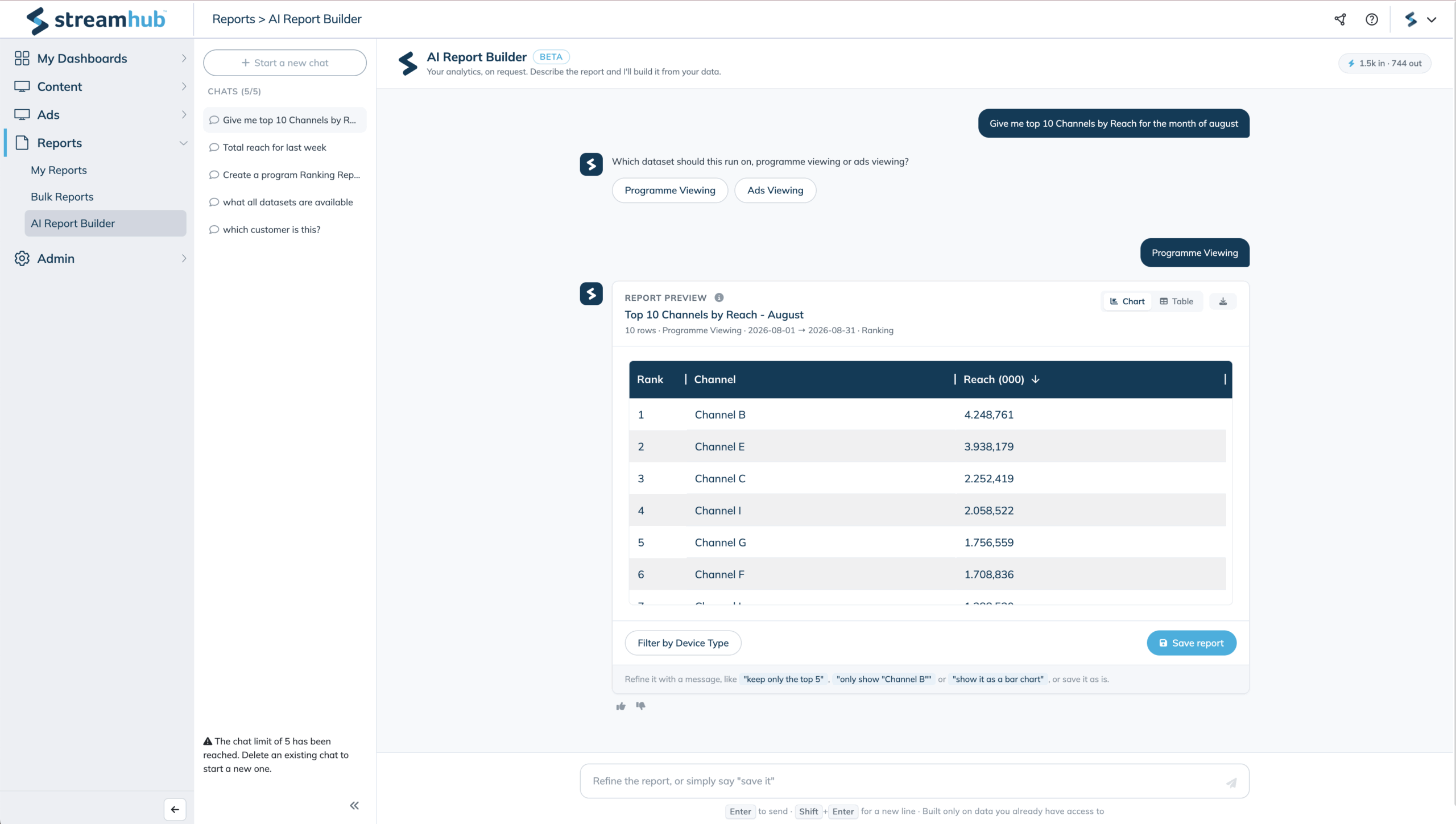
Type something like “show me daily impressions by program for the last 30 days,” and the assistant maps that request onto a report configuration, runs it, and shows you a preview before anything is saved. If your request leaves something ambiguous, like which metric or time frame you mean, the assistant asks a follow-up question instead of guessing, so you end up with the report you actually wanted.
Once you’re happy with the preview, saving it adds the report to My Reports, just like a report built the manual way.
Example: a chat prompt building a Reach by channel report, ready to save.
Why it matters
For Ad Sales, Marketing, and Content teams Previously, getting a specific cut of data, like a chart of impressions by program, meant either learning the dimension and metric model yourself or asking someone else to build it for you. Now you can describe what you want in a sentence and get a working report back, so you can find the answer yourself in the moment you need it instead of waiting on a request.
That includes Streamhub’s total TV reporting, not just digital since AI Report Builder works from whatever datasets you already have access to, the same plain-language approach applies whether you’re after a TV cut of the numbers or a digital one, rather than switching tools or mental models depending on which side you need.
On data access AI Report Builder only works with the datasets, dimensions, and metrics you’re already permitted to see. The assistant turns your prompt into a structured report configuration behind the scenes; it doesn’t read or process your underlying data directly. Existing access rules apply exactly as they do in Report Builder today, so using the chat interface doesn’t open up anything you couldn’t already see manually.
How to use it
- Go to Reports > AI Report Builder and start a new chat
- Describe the report you need, including the dimension, metric, date range, and any filters that matter
- Review the chart or table preview, and refine it with a follow-up message if it’s not quite right
- Click Save report to add it to My Reports
If something in your request is ambiguous or missing, the assistant will ask a clarifying question before running the report, rather than guessing at what you meant.
How it works
AI Report Builder doesn’t introduce a new reporting engine, it’s an AI layer sitting in front of the same Report Builder infrastructure you already use.
When you type a request, a language model reads your prompt alongside the list of datasets, dimensions, and metrics you’re permitted to access, and converts that into a structured report configuration, the same shape Report Builder uses internally for dataset, dimensions, metrics, filters, date range, and chart type. That configuration is then run through the existing report computation and polling flow to produce the preview you see, and saved through the existing save-report flow when you confirm. No new APIs were introduced to support this.
Because the model’s job is limited to turning text into a structured configuration rather than open-ended generation, it never receives or processes your underlying report data, only the metadata needed to build a valid configuration. Permission checks happen exactly where they already do today, so the assistant can only construct reports from data you’re already allowed to see.
What to expect next
This first version covers standard reports built and saved through chat. A few things are intentionally out of scope for now and may be considered for later phases: advanced grouping configurations (row/column hierarchies), editing an already-saved report via chat, and dashboard building, scheduling, or export flows. AI Report Builder is also a separate page from the existing Report Builder for now; the two aren’t merged.

Rathish Radhakrishnan
Lead Product Owner